Posts

Image
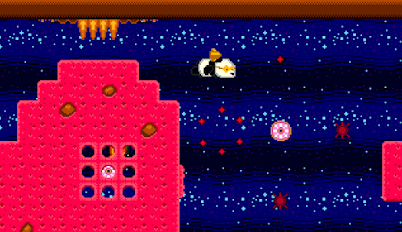
Passing Breeze, An Arcade Adventure. Our entry for Retro Platform Jam #5 We normally try to make something technically impressive for these jams, but this time we just decided to do something different. We'd never made an Interactive Fiction before. Our platform of choice was again the SEGA Genesis. The Jam theme was Breezy, so as old arcade game lovers we thought of Passing Breeze, the music from SEGA's Outrun. This all fitted together nicely. We'd do an adventure game based in a 1980s(ish) arcade. PICTURES Even though it's simple, I wanted to do something a little technical, so decided to see what sort of images we could display. I started with a simple 16 color image, then tried to do 31 colors by combining the two background scroll layers, A and B. (31 because the top layer would need a transparent color to show the bottom layer through) This all comes down to the tooling. (another story, as I'm converting my game tools to WinForms at the moment).  So I wrote t...

Converting Gunslugs to Megadrive / Genesis

Image
Overview This is all about porting Gunslugs, a PC game written in Java (by OrangePixel  ) to SEGA Genesis / Megadrive, written in 68000 assembler. Original Game (PC) Genesis Conversion Code Objects / Entities There are quite a lot of active objects at once in the original game- something lke 100-200 plus bullets and effects. This would not be doable on the Genesis, so instead I generate a list of spawn points for level objects. These are sorted horizontally so that I only need to check one at a time as the screen scrolls. Once a spawnpoint is determined to be just off the right edge of the screen, it is promoted to being an active GameObject, and the spawer code continues looking for the next object in the spawner list. Early on I knew there would be a problem with this, due to objects disappearing off the left of the screen. In the original these continue to be active. But at the start I didn't know enough about the game to determine what to do about it. In other games I'd uns...
Image
 Game Jam Entry: Super Overkill It's difficult to get a screenshot without dying! Technical: It's an arena shooter. The Game Jam theme was 'super' so I wanted to see if I could do some technical stuff for over the top effects, as well as having lots of bullets and enemies to kill. I thought about using hardware sprites for effects. There are some restrictions with using sprites on the Genesis, namely a limit of 80 on screen at once, and 20 per scan line (also a max number of pixels per scan line). It's possible to re-write the sprite list on the horizontal blank interrupt to re-use sprites, and effectively have a lot more on screen. I looked in to this a little, but gave up on the idea as if it didn't work there would not be much time left in the Jam to do something different. I will have a go with it in the future, to see what can be done. The other alternative with sprites is to be clever with the graphics which are being used, to make it appear that there are...
Image
Big Scaled 'Sprites' All game development is cheating. The older and slower and simpler the hardware, the more cheating you need to do! So how to achieve big scaling backgrounds?  The first solution I came up with was just to store all the frames of a scaling animation, convert all frames to a character set, and store down a character map for each frame of the animation. This actually works great, and is really simple to implement. However the problem lies in authoring the content. We couldn't find a decent way to scale images on character boundaries in Aseprite, and the other approach I was going to try was to add another tool in to the toolset to do the map scaling for me. (in fact, we might well do this at some future point - depends on usage) But instead I decided to give the 'real time' scaling a shot first, just to see how slow it would be. It'd be a fun bit of code to create, at least. To make things simple and fast I output some helper data from my c# to...
Image
 GameObject Sequencer. Bosses made simple. For every general enemy type in the game I simply code up its actions, at the same time building a library of commonly used functions, for instance animation, path following, or wall collision. Getting on to bosses though, it makes sense to expand the system a bit to allow for (slightly) more complex behaviours. So what does a boss do in this game? Generally they all follow the same sort of pattern.. follow a sequence of mini-actions, attacking the player, moving around, becoming vulnerable or invulnerable to attack, etc. This needs to be easily editable at a high level, too. so iterating on gameplay is efficient. Cheese Boss Here's the Cheese Boss, and below is his sequence in 'code' BossCheese_Sequence1: .loop:     SEQ_IMMEDIATE BossCheeseSeq_StartScreenShake,0     SEQ_IMMEDIATE BossCheeseSeq_SetInvisible,0     SEQ_PAUSE 100     SEQ_STATE ...
Image
The GameObject System The heart of this Genesis game / engine is the GameObject system. And it doesn't really get much simpler than this. (These aren't Unity GameObjects!) I have a single list of GOs - each being an area of memory - effectively in a list. They are (sort of) structures. (there are not really any structs or classes in assembler) These contain the basics which every kind of GO needs. Data like position, velocity, animation frame, flags, etc. Alongside that they have some space which can contain different data for different types of GOs. There is no concept of a class hierarchy, each GO is the same from the code's point of view. Having a fixed size structure is an enormous advantage. It keeps things simple, and removes the need to have different sorts of lists for different objects. For speed when adding / deleting objects I keep lists of pointers. One for GameObjects which are in use, and one for those which are inactive, so this operation always takes a fixed...

On the Tiles

Image
  When designing art for the Sega Megadrive, it's important to understand how the console handles graphics. The Megadrive uses a custom graphics chip called the Visual Display Processor or VDP. The VDP is tile-based - graphics are stored in tiles that are 8x8 pixels big. Sprites are split into tiles which are then read in sequence to display them. Each of the tiles references one of the 4 colour palettes available. The above image shows how the VDP has stored the graphics from the main window and the 4 colour palettes being used. (The 5th line of colours is not in the data, but used by the Gens emulator for testing). 8x8 tiles are the basis for all the graphics. So all sprites and game tiles have to conform or fit into multiples of 8, e.g.: 16x16, 32x32, 16x48, 8x24, etc. The VDP stores all this information in it's VRAM, which is limited to 64K. One of the tricks the Megadrive can use is to use DMA (Direct Memory Access) to copy data from the game ROM to the VDP. This takes som...