Posts

On the Tiles

Image
  When designing art for the Sega Megadrive, it's important to understand how the console handles graphics. The Megadrive uses a custom graphics chip called the Visual Display Processor or VDP. The VDP is tile-based - graphics are stored in tiles that are 8x8 pixels big. Sprites are split into tiles which are then read in sequence to display them. Each of the tiles references one of the 4 colour palettes available. The above image shows how the VDP has stored the graphics from the main window and the 4 colour palettes being used. (The 5th line of colours is not in the data, but used by the Gens emulator for testing). 8x8 tiles are the basis for all the graphics. So all sprites and game tiles have to conform or fit into multiples of 8, e.g.: 16x16, 32x32, 16x48, 8x24, etc. The VDP stores all this information in it's VRAM, which is limited to 64K. One of the tricks the Megadrive can use is to use DMA (Direct Memory Access) to copy data from the game ROM to the VDP. This takes som...
Mega Palettes

Image
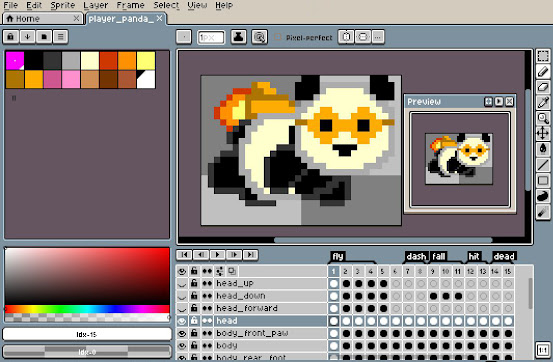
  Ah, the Sega Megadrive, halcyon days. I remember pre-ordering mine from Special Reserve and eagerly awaiting the launch date. They sent me a copy of Super Monaco GP and a second control pad, which I got to stare at for a week before the console itself finally arrived. It was worth the wait. I still own one today. If you're going to make graphics for a Megadrive game, then you're going to be spending a lot of time with palettes! Aside from the pixel art program Aseprite, the most useful graphics tool I have is a post-it note stuck to the monitor with the numbers 0, 52, 87, 116, 144, 172, 206, 255 written on it. I am almost exclusively using Aseprite to produce the graphics for Rocket Panda, and occasionally Cinema4D to render any 3d animated objects which then need to be processed through Aseprite. The end result is a series of sprite and tile sheets which are mapped to particular palettes. Creating these palettes is the crux of the operation and has to be nailed down fairly e...
Image
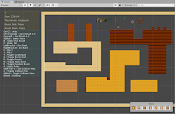
 A bit of editor tooling: Tile Editor. OK, there are a lot of tile editing tools out there. Also I have no idea how many of these I have made over the years, on Amiga, ST, DOS, Win32, and even a simple editor on the Megadrive itself! But, this project is about making as much from scratch as possible, and learning a bit of Unity on the way. So, here's the Genesis Tile Map Editor! One of my favourite tile editors was the Rainbow Arts one, on Amiga. Sadly, and surprisingly I can't find any reference to this on the internet! I dont know how we came to use it either. I suspect it was some dodgy hacked copy! Anyway this program used a lot of keyboard shortcuts from DPaint, and so was quick to pick up for anyone in game development in the 90s! It's all based on Brushes. Grab a rectangular brush with B, and place it with your cursor. (while applying any transforms or effects on the way).  The other important feature is that of tile rules. This enables us to draw out a basic shape f...
Image
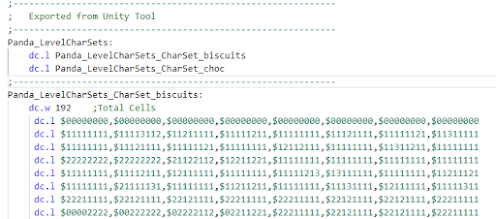
 Getting The Data So, having decided on using Unity to create the data (levels, sprites, definitions. etc.).. how to get it in to the game? A common way when using assembler is to dump out binary files and #incbin them in to the code base. This always had the advantage of being quick to assemble, as all the assembler needs to do is to copy the binary contents of a file to a particular location. The downside is that it's not so easy to debug. Now that my PC is probably 100000x quicker than anything I used in the 90s, assembler time isn't an issue at all. Assembling the entire project takes way less than a second! So instead, I opted for the other common technique, which is to export files with asm code and data in them. All data is now exported as labels, tables, and declarations in source. This has the wonderful advantage of being much easier to debug. Here's an example of exported level data: As all the assets are given labels inside the editor, the labels get recursed dur...
Image
 A Proper Project? So, after playing around with demos, and Xmas getting in the way, i thought I'd make something a bit more substantial. The main reasoning behind this was once again to build up the tool set.  So.. what to make?  I've made Thrust-type games a number of times, on different platforms. Even one in 68000 on PalmPilot 20+ years ago. So that was an obvious choice. Not too much to think about gameplay-wise, so I could concentrate on engine and tools.  I drew a rough quick map in Paint.Net, and some test sprites, and hard coded everything in.. sprite positions, movement code, etc. After that, the first thing I wanted to do was 'linked sprites' - that is going to be a big part of making Genesis games going forward. This is simply making larger graphical objects out of multiple Genesis hardware sprites, and linking them up and animating them. Made a little tool in Unity to put frames together, and used the exported data in the Genesis code to get animations i...
Image
 First! Space Pants Games - that's me, Julian / LongAnimals, and Ben / Asute deciding to make some games for the Sega Megadrive / Genesis. Why? Pretty much for fun. I wanted to get low and dirty after using Unity for so long. I made Genesis games in the 90s, and it's one of my favourite consoles to write games on. I wondered how much easier it would be to make games these days compared with using the tools available in 1994! More on that later, but here's a taster: it's MUCH easier now. I started playing with the Genesis in early December 2020, taking some time away after a major release for the Day Job. I found SDGK by Steph, and had a play with it. It really is some great work, a full C engine for Megadrive. Whenever I'm asked what game to make by people learning to code for the first time, I start with Pong, and work up to other old games, including Asteroids. So I put my money where my mouth was and made a little Asteroids game in C, in SGDK. Something  like thi...